If you want cybersecurity recruiters to notice your LinkedIn profile, listing your certifications like CISSP, CompTIA Security+, or CEH is a must. Profiles with certifications get 6x more views and 30% more recruiter messages, making it easier to stand out in a competitive field. Here's how to do it:
- Go to your LinkedIn profile, click "Add profile section", and select "Licenses & Certifications."
- Enter details like the certification name, issuing organization, issue date, and optional fields like Credential ID and URL for verification.
- Use full names and abbreviations (e.g., "Certified Information Systems Security Professional (CISSP)") to improve searchability.
- Link relevant skills (up to five per certification) to boost visibility in recruiter searches.
- Keep certifications current by updating expiration dates and renewal details.
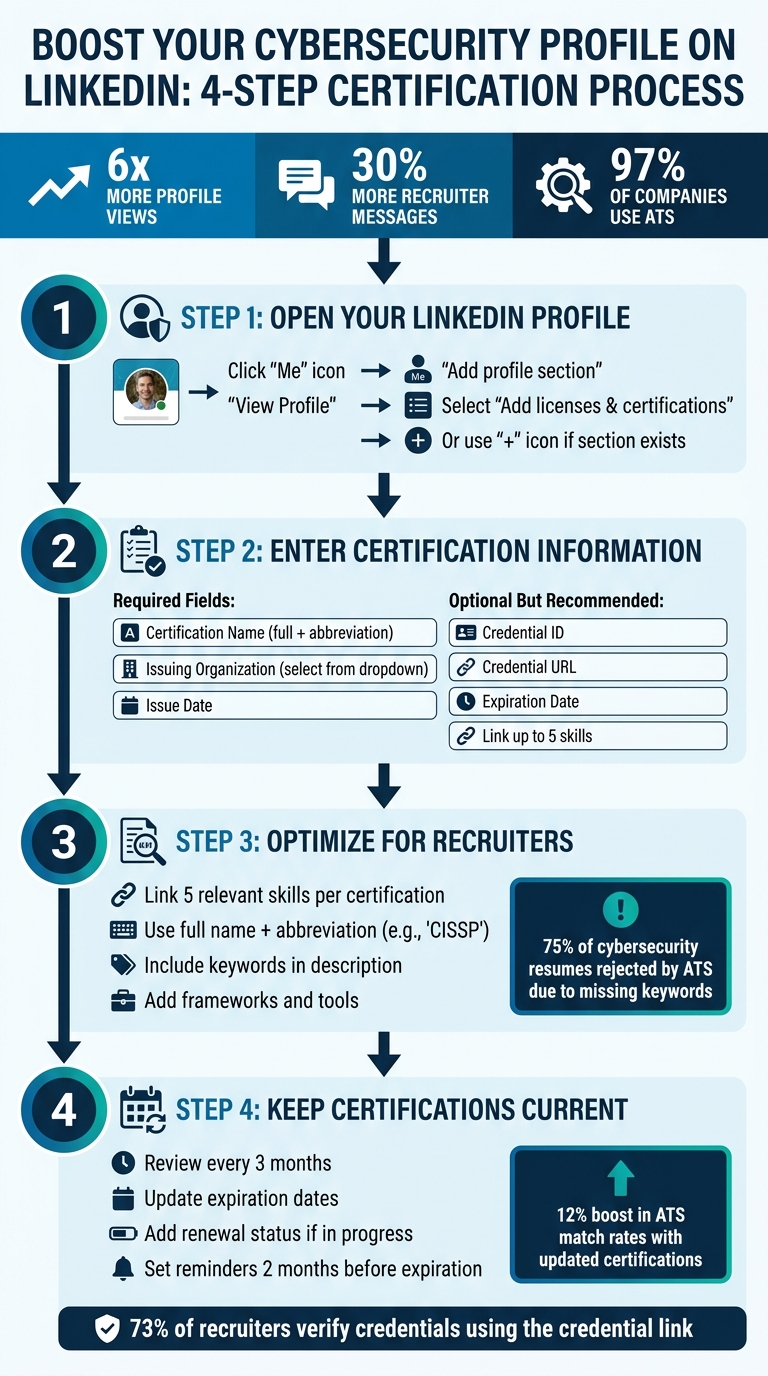
How to Add Cybersecurity Certifications to LinkedIn in 4 Steps
Cyber Security LinkedIn Tutorial for Beginners

sbb-itb-8a31326
Step 1: Open Your LinkedIn Profile and Find the Certifications Section
First, log in to LinkedIn. Click on your profile photo (the "Me" icon) in the top navigation bar, then select "View Profile."
Once you're on your profile page, locate the "Add profile section" button just below your headline. Click it, and expand the available options (like "Core" or "Recommended") to find the certifications form. From there, select "Add licenses & certifications" to open the form where you can input your certification details. If you've already listed certifications, you can simply click the "+" icon in the "Licenses & certifications" section to add a new one.
If you're using a desktop, this process is simple. On mobile, tap your profile picture, choose "View Profile," and look for either the "Add section" button or the pencil icon to access the certifications area.
Some certification providers make it even easier by offering an "Add to Profile" button. This feature automatically fills in your certification details, saving you time if your provider supports it.
Step 2: Enter Your Certification Information
When the form opens, make sure to fill out all the required fields. Adding optional details can also help strengthen your profile and increase your visibility to recruiters.
Once you find the certifications section, input your details as outlined below.
Required Fields and Why They Matter
Begin with the Certification Name. Always use the complete title of your certification. For instance, instead of just "CISSP", write "Certified Information Systems Security Professional (CISSP)." This ensures your profile appears in recruiter searches that rely on specific keywords.
Next, include the Issuing Organization. As you type, LinkedIn will suggest official company pages in a dropdown menu. Select the correct organization from this list rather than typing it manually. This step is important because it displays the organization’s logo next to your certification, adding instant credibility and brand recognition.
Add the Issue Date to show when you earned the certification. This helps establish the timeline of your professional growth and keeps your profile up to date.
Optional Fields: Improving Your Profile
Including the Credential ID and Credential URL can enhance your profile further. These details make it easier for recruiters to verify your certifications.
- Credential ID: This is the unique identifier provided by the certification issuer (e.g., "COMP001020304050" for CompTIA certifications). Copy it exactly to avoid mistakes.
- Credential URL: This should link to a public verification page for your certification. Avoid links to login-protected dashboards. Test the URL in an incognito browser to ensure it works correctly.
| Field Name | Required? | Example |
|---|---|---|
| Name | Yes | CompTIA Security+ |
| Issuing Organization | Yes | CompTIA |
| Issue Date | Yes | April 2026 |
| Credential ID | No | COMP001020304050 |
| Credential URL | No | https://verify.comptia.org/cert |
For certifications that require periodic renewal, like CISSP or Security+, include the Expiration Date to show that your credentials are current. If your certification has expired, don’t delete it. Instead, list the expiration date to highlight your professional development history.
Additionally, you can link up to five skills to each certification, such as "Penetration Testing" or "Incident Response." This can make your profile more searchable and appealing to recruiters.
After entering your certification details, you’ll be ready to make them even more visible in the next step.
Step 3: Make Your Certifications Easy for Recruiters to Find
Adding certifications to your profile is important, but it’s just the first step. The real challenge? Making sure recruiters can actually find you. With over 97% of companies using Applicant Tracking Systems (ATS) to screen cybersecurity resumes and LinkedIn profiles, missing the right keywords could mean your profile never shows up - even if you’re the perfect match for the job.
Here’s how you can boost your visibility by linking relevant skills and using targeted keywords.
Link Relevant Skills to Your Certifications
LinkedIn allows you to connect up to five specific skills to each certification you add. This is a game-changer because it helps recruiters find you when they search for candidates with those exact skills.
For example:
- If you’ve earned a CISSP, link skills like "Risk Assessment", "Security Architecture", "Incident Response", "NIST Framework", and "Access Control."
- For a CompTIA Security+ certification, consider skills such as "Network Security", "Threat Analysis", "Vulnerability Assessment", "Cryptography", and "Security Operations."
"Certifications (CISSP, OSCP, CEH, GIAC) are the most important keywords in security recruiting - they're literal Boolean search filters." - Careery Team
Be specific in your skill choices. Terms like "Offensive Security" are much more effective than broad phrases like "Cybersecurity Expert." Recruiters rely on exact terms to filter candidates, so precision is key.
To further improve your profile’s visibility, make sure to include these keywords throughout your profile - not just in the certifications section.
Use Keywords to Improve Visibility
In addition to linking skills, optimize your certification details with both the full name of the certification and its abbreviation. Recruiters often use Boolean searches like "cybersecurity AND CISSP AND cloud security." Including both versions ensures you show up in filtered results.
For example:
- Instead of just listing "CISSP", write "Certified Information Systems Security Professional (CISSP)."
- Use the description field to highlight tools and frameworks you’ve learned. For instance:
- For CEH: "Mastered penetration testing techniques using Metasploit, Burp Suite, and Wireshark to identify vulnerabilities in web applications and network infrastructure."
- For CISA: Include frameworks like "ISO 27001", "SOC 2", and "NIST Cybersecurity Framework."
Here’s a quick reference for key search terms based on different security domains:
| Security Domain | Key Search Terms to Include |
|---|---|
| Offensive Security | Penetration testing, Red team, Ethical hacking, Vulnerability assessment, OSCP |
| Defensive Security | Incident response, Threat hunting, SIEM, SOC operations, Blue team, GCIH |
| GRC & Compliance | Risk assessment, SOC 2, ISO 27001, NIST framework, PCI DSS, CISA |
| Cloud Security | AWS Security, Azure Security, DevSecOps, Zero trust, CCSP |
Additionally, consider adding emerging terms like "AI security", "LLM security", "zero trust architecture", and "cloud-native security".
75% of cybersecurity resumes are rejected by ATS before a recruiter even sees them. This often happens because of missing keywords like "SIEM" or "Penetration Testing". Avoid this by making sure your certifications and skills are fully optimized with the right terms.
Step 4: Keep Your Certifications Current
Getting certifications is just the start - keeping them current is where the real work begins.
Outdated certifications can do more harm than good. Modern Applicant Tracking Systems (ATS) often flag expired credentials, which can lower your overall candidate score. On the flip side, resumes with clearly updated certifications enjoy a 12% boost in ATS match rates.
Make it a habit to review your "Licenses & certifications" section every three months. For each certification, click the pencil icon and double-check that both the Issue and Expiration Dates are accurate. When you renew a certification, update these dates along with the new Credential ID. Don’t delete expired certifications - just list them with the correct expiration date to show your commitment to ongoing learning.
Cybersecurity certifications, for instance, usually need to be renewed every 2-3 years. CISSP is valid for three years, while AWS and Azure certifications also typically expire within that same timeframe. If one of your key certifications is about to expire, add a note like "Renewal in progress – expected 08/2026" in the description. This signals to recruiters that you’re actively maintaining your credentials.
Set up calendar reminders at least two months before your certifications are due for renewal. Organizations like CompTIA and ISC² often let you take recertification exams up to 60 days before the expiration date. Also, use the "Show credential" link on your profile to let recruiters verify your certification status directly with the issuing organization - 73% of recruiters click on this link to confirm authenticity.
When you renew a major certification, take it a step further by sharing the news in a LinkedIn post. This not only updates your network but also enhances your profile’s visibility and credibility.
Conclusion
This guide has walked you through the steps to add and fine-tune your cybersecurity certifications on LinkedIn. Including these certifications is both straightforward and impactful. Simply head to the "Licenses & Certifications" section on your profile and make sure to fill in all fields - especially the Credential ID and URL. These details provide recruiters with easy ways to verify your qualifications.
You can take your profile to the next level by linking certifications to relevant skills and incorporating precise industry keywords. This approach not only makes you more visible in recruiter searches but also helps you pass applicant tracking systems (ATS) with ease.
Keep your certifications section up to date by including accurate expiration dates and renewal details. This shows you're committed to staying informed in a fast-changing field. On the other hand, outdated information can hurt your chances of passing ATS filters, while fresh certifications highlight your dedication to continuous learning.
If you're new to cybersecurity, certifications can be especially helpful. They demonstrate verified, industry-standard expertise, even if work experience is limited. A polished certifications section can help close the gap between where you are now and where you want to go. For more tips on starting your cybersecurity journey, check out Root School.
FAQs
Where should I put cybersecurity certifications on LinkedIn?
You should include your cybersecurity certifications in the Licenses & Certifications section of your LinkedIn profile. This section is tailored for highlighting professional credentials, ensuring they are prominently displayed to recruiters and hiring managers. By placing your certifications here, they become more visible in searches and are less likely to get lost in sections like your summary or work experience.
What skills should I link to each certification?
When adding skills to your LinkedIn profile that align with cybersecurity certifications, emphasize technical expertise and core security practices. For instance, include skills such as encryption, firewalls, intrusion detection systems, vulnerability assessment, and security implementation. Showcasing these skills highlights your capabilities in areas like network security, threat detection, and vulnerability management, making your profile stand out to recruiters and boosting your professional credibility.
How do I list an expired certification on LinkedIn?
It's usually a good idea to leave expired certifications off your LinkedIn profile, as they can come across as outdated or irrelevant. But if you decide to include one, make sure to add it under the "Licenses & Certifications" section and clearly state the expiration date or note that it’s no longer active. This way, you're being upfront while still showcasing past training or skills that might still hold value.