If I were starting threat intelligence today, I’d keep it simple: learn security basics, study a few core models, practice with public reports and free tools, and write short notes every week. That gives me a clear path instead of trying to learn everything at once.
Here’s the short version:
- Start with basics: networking, Windows/Linux, log reading, phishing, and ransomware flow
- Learn 3 core models in order: MITRE ATT&CK, Diamond Model, and Cyber Kill Chain
- Use public sources: CISA alerts, vendor threat blogs, and ISAC bulletins
- Practice with tools: Wireshark, tcpdump, VirusTotal, ANY.RUN, MISP, Splunk Free, or Wazuh
- Build output you can show: IOC lists, ATT&CK mappings, and short intelligence notes
- Follow a 3- to 6-month plan: about 10–15 hours per week, or roughly 150–300 hours
What matters most is not memorizing terms. It’s learning how to read an incident, sort the facts, test my guesses, and explain what needs attention next.
A simple way to think about it is this:
- Month 1: learn the basics
- Months 2–3: learn the main models
- Months 3–4: work with tools and public threat data
- Months 4–6: write reports and build a small portfolio
The goal is simple: turn raw threat data into clear next steps. If I can map attacker behavior, sort indicators, and write a short brief that someone else can use, I’m on the right track.
Cyber Threat Intelligence for Beginners: Full Course 2026 | iTCA #course
sbb-itb-8a31326
Build the Foundations Before You Specialize
CTI reports get much easier to read once you know the technical and analytical basics they quietly assume. Start there. It gives you the context you need to follow the language, the frameworks, and the logic behind the reporting.
Security Basics CTI Depends On
You don’t need to be a network engineer or a system administrator. But you do need enough background to read an incident timeline and understand what each step is telling you. In practice, four areas matter most.
Networking is the first one. CTI analysts deal with IP addresses, domains, ports, and protocols all the time. If you know how DNS resolves a domain, how TCP/IP connections work, and how attackers bury command-and-control traffic inside normal web traffic, network indicators start to mean something. You’re not just copying them out of a report anymore.
Operating systems are next. On Windows, that means knowing common processes, scheduled tasks, startup items, and user profile paths. On Linux, it means knowing /etc, /var/log, systemd services, and file permissions. Those details make host artifacts, report indicators, and attack paths much easier to follow.
Authentication and access control also matter a lot because so much attacker activity involves credential theft, account takeover, and lateral movement. If you understand how passwords, multi-factor authentication, and directory services work, you can follow those parts of an attack story without getting lost.
Then there’s the basic flow of common attack types like phishing and ransomware. A malicious email can lead to payload execution. Ransomware can move from initial access to file encryption in stages. Once you know that flow, the big-picture story in a CTI report connects more cleanly to the technical details underneath it.
Analysis Skills CTI Uses Every Day
Technical knowledge gets you into the data. Analytical skill shapes what you do with it.
CTI is not just indicator spotting. It’s about drawing sound conclusions from incomplete data.
Structured thinking means breaking an incident into stages and sorting your information that way, instead of bouncing between disconnected observations. Hypothesis testing means proposing an explanation for what you’re seeing - maybe an unusual login is credential stuffing, a misconfiguration, or malware - and then looking for evidence that could prove you wrong, not just evidence that backs your first guess.
That matters because confirmation bias can pull you off course fast. After reading weeks of ransomware headlines, it’s easy to assume every suspicious alert points to ransomware, even when the evidence says otherwise. Good analysis pushes past that reflex. That’s how raw observations turn into a useful assessment.
Source reliability matters every day. Vendor CTI blogs, government advisories, and research group reports all come with different methods, incentives, and blind spots. A commercial vendor may lean toward threats its product detects. A report from one region may not see much outside its own sectors or geographies. If you’re new to CTI, get in the habit of asking two things: How does this source know what it claims? And what might it be missing?
Use those skills together. Technical facts tell you what happened. Analysis tells you what matters.
| Skill Area | Why It Matters in CTI | Beginner Practice Method |
|---|---|---|
| Basic networking (IP, DNS, ports) | Lets you interpret network indicators and spot suspicious traffic patterns | Review sample firewall logs or PCAPs; flag unusual IPs or domains |
| OS and log basics | Maps attacker behavior to host artifacts and events | Review a small Windows Event Log sample and identify logon activity |
| Phishing & ransomware basics | Helps you recognize common attack flows in CTI case studies | Read 2–3 incident write-ups and map the attack steps |
| Structured thinking | Keeps investigations organized across attack stages | Build a timeline from a breach report, grouping events by attack phase |
| Hypothesis testing | Prevents premature conclusions and supports sound assessments | List two possible explanations per case study and note what data supports each |
| Source reliability checks | Reduces risk of acting on weak or biased information | Compare two write-ups on the same threat; note where evidence and tone differ |
Next, use this foundation to learn the core CTI frameworks in order.
Learn the Core Frameworks and Concepts in Order
Once you know the basics, frameworks help you make sense of what you read. You'll see them again and again in reports, SOC notes, and incident write-ups. The key is simple: know what each framework does and when to use it.
Start with MITRE ATT&CK, Then Add the Diamond Model and Cyber Kill Chain
Start with MITRE ATT&CK. For beginners, it's the most useful place to begin because it shows what attackers do on actual systems. It organizes that behavior into tactics and techniques. MITRE describes it as "a globally accessible knowledge base of adversary tactics and techniques based on real-world observations."
Don't try to memorize the full matrix in one shot. That's a fast way to fry your brain. Instead, stick with a few common tactics first:
- Initial Access
- Execution
- Persistence
- Credential Access
- Lateral Movement
Then learn a small set of techniques under each one.
After ATT&CK, move to the Diamond Model. This framework helps you connect attacker behavior to the people and systems behind it. It shifts your attention from what happened to who is involved and how. Each intrusion event is viewed through four nodes: adversary, capability, infrastructure, and victim. It's handy for summing up campaigns and following threat groups over time. A good weekly exercise is to take one public advisory and map its adversary, capability, infrastructure, and victim.
Next, add the Cyber Kill Chain. It gives you a step-by-step view of an attack, from Reconnaissance through Actions on Objectives. That makes it useful when you need to explain attack timelines to incident responders or point out where defenses might have stopped the intrusion.
| Framework | Primary Purpose | Analytical Focus | Best Beginner Use Case |
|---|---|---|---|
| MITRE ATT&CK | Organize adversary behavior into tactics and techniques | Real-world attacker behavior across the attack lifecycle | Map alerts and reports to techniques; learn common attacker methods |
| Diamond Model | Analyze intrusions as relationships between core elements | Adversary, capability, infrastructure, and victim | Practice actor-centric thinking; summarize campaigns and visualize indicator relationships |
| Cyber Kill Chain | Describe the sequential stages of an intrusion | Ordered attack phases from recon to final impact | Explain attack progression; identify defensive gaps; structure incident post-mortems |
CTI Terms You Will See in Real Reports
Public advisories and breach write-ups tend to use the same small set of terms. Once you know them, reports become much easier to read.
A threat actor is the person or group behind malicious activity. A campaign is a set of related operations linked by infrastructure, tools, or targeting.
TTPs - tactics, techniques, and procedures - describe how an actor works. NIST defines them as a layered description of behavior: tactics are the highest-level goal, techniques are more specific methods, and procedures are the most granular, repeatable steps. In reports, TTPs often show up as things like credential harvesting or living-off-the-land methods, sometimes with ATT&CK mappings attached.
IOCs - indicators of compromise - are artifacts that suggest a system may be compromised. These can include malicious domains, IP addresses, file hashes, email subjects, and registry keys. Most advisories include an IOC table that defenders can use right away to block or monitor activity.
Priority Intelligence Requirements (PIRs) are the questions a security team needs answered. For example: which ransomware groups are currently targeting mid-sized U.S. financial institutions? PIRs shape what intelligence gets collected and what gets written.
When you read a report, pull out the threat actor, campaign, TTPs, IOCs, and PIRs it covers. Then write two or three questions the report answers.
Use these terms when you practice with public reports and tools.
Practice with Real Tools, Public Data, and Writing Exercises
Frameworks and terms help, but only up to a point. Sooner or later, you need to open a tool, pull a live report, and do the job.
The good news is that a lot of practice material is free, public, and centered on the U.S. A solid place to start looks like this: begin with Wireshark and tcpdump on lab traffic so you can get used to reading packets. Then move to VirusTotal and ANY.RUN for malware and URL analysis. ANY.RUN has a free community tier that lets you submit suspicious files and watch live process trees, network connections, and dropped files. Once you feel steady working with indicators, set up MISP so you can organize what you're collecting in a clean, structured way. After that, add a free SIEM such as Splunk Free or Wazuh to practice log ingestion and basic alert triage.
Use the same ATT&CK, IOC, and reporting skills here, just on live data instead of study examples.
For public data, CISA alerts and advisories are a strong first stop. They cover real ransomware campaigns, nation-state activity, and vulnerability exploitation aimed at U.S. organizations. They also often include IOCs and mitigation steps you can use right away. Threat blogs from Microsoft, Cisco Talos, CrowdStrike, and Mandiant usually go deeper into actor profiles and malware families, and many already include ATT&CK mappings. If you want to focus on one sector, check the matching ISAC bulletin. The Financial Services ISAC and Health-ISAC both publish incident summaries and threat guidance written for practitioners.
| Tool Category | Example Tools | Ease of Access | Beginner Learning Value | Incident Response Relevance |
|---|---|---|---|---|
| Threat Intelligence Platform (TIP) | MISP | Moderate (Linux setup required) | High – IOC structuring, feeds, sharing standards | High – supports indicator enrichment and correlation |
| Malware Sandbox | ANY.RUN, Cuckoo Sandbox | High for ANY.RUN (browser-based, free tier); Lower for Cuckoo (local setup) | High – malware behavior, network artifacts, dropped files | High – quickly understand what a suspicious file or URL does |
| OSINT Sources | CISA alerts, vendor blogs, ISAC bulletins | High – mostly free and publicly available | High – real-world campaigns, professional CTI writing style | High – actionable indicators and mitigation steps included |
| SIEM / Log Tools | Splunk Free, Wazuh, IBM QRadar Community Edition | Moderate – resource and config requirements | High – log parsing, detection queries, alert triage | Very High – central to most SOC workflows |
Start small: one tool, one report, one repeatable workflow. That's how the pieces start to click.
Small Projects That Build Portfolio-Ready Artifacts
Pick one public report and work it from start to finish. A recent CISA advisory or public incident report on ransomware or phishing works well. Then do four things:
- Map each described behavior to an ATT&CK technique
- Pull all indicators into a structured IOC list in CSV or JSON
- Run some of those indicators through VirusTotal or ANY.RUN
- Write a short intelligence note that sums up what you found
That intelligence note is the part many beginners don't spend enough time on. And honestly, that's a mistake. A strong note has three parts: a two-to-four-sentence executive summary that explains what happened, who is affected, and what should happen next; a key findings section with your ATT&CK mappings and main indicators; and a technical appendix with the full IOC table and any sandbox output.
Keep the executive summary free of jargon for a nontechnical manager. That rule forces clear thinking. And in CTI, clear writing matters just as much as technical skill.
This kind of output isn't just practice. It's a usable intelligence note and IOC list tied straight to incident-response work. Each project gives you something you can show when applying for entry-level CTI and SOC roles.
Build a 3- to 6-Month Learning Plan and Track Your Progress
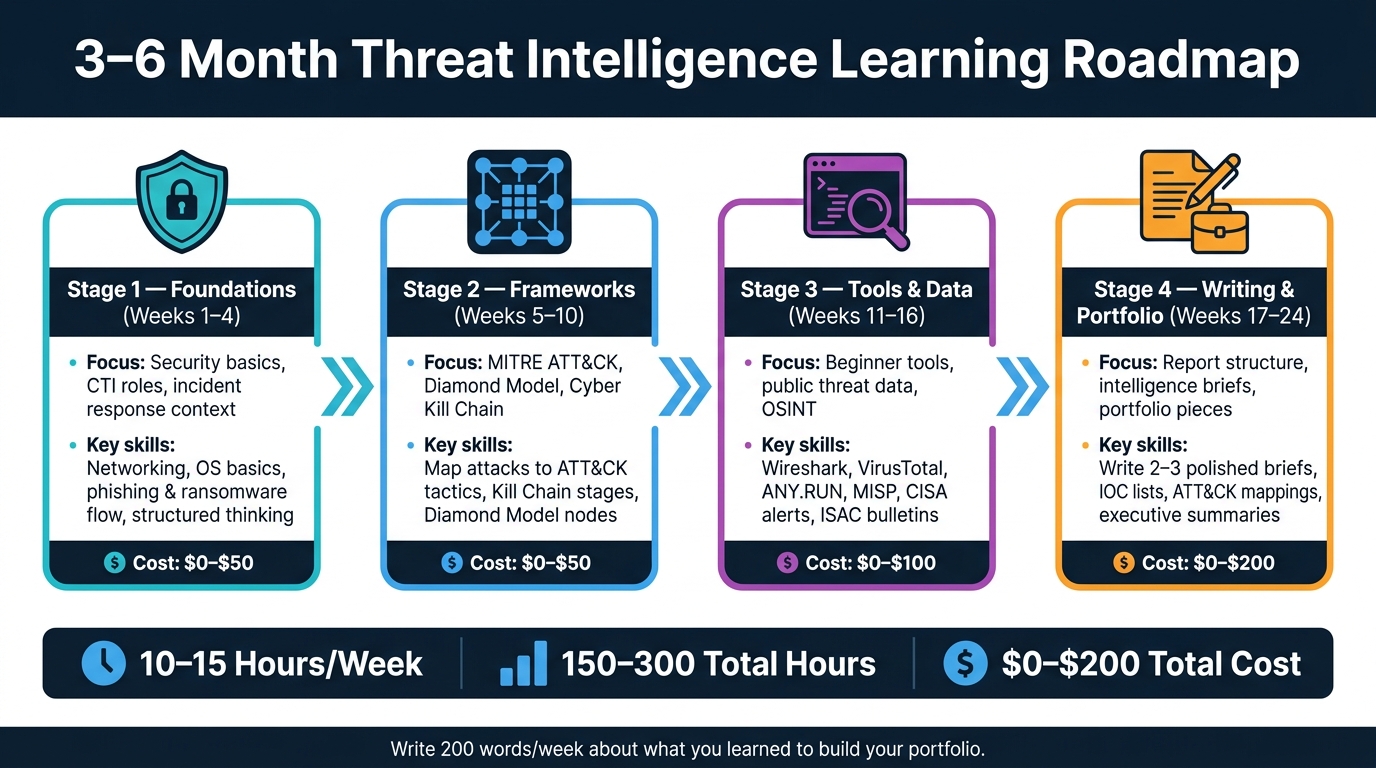
3–6 Month Threat Intelligence Learning Roadmap
Put the frameworks, tools, sources, and projects above into a weekly routine. A simple plan with clear milestones makes it much easier to keep going.
Break Your Study Plan into Clear Milestones
A realistic pace is 10–15 hours per week: about 1–1.5 hours on weeknights and 3–5 hours on the weekend. Over time, that adds up to 150–300 focused hours.
Move through the stages in order so each skill builds on the one before it. Split your time across these four stages:
| Stage | Focus | Expected Skills | Typical Duration |
|---|---|---|---|
| Stage 1: Foundations | Security basics, CTI roles, incident response context | Explain core security concepts and CTI's role in incident response | 3–4 weeks |
| Stage 2: Frameworks | MITRE ATT&CK, Diamond Model, Cyber Kill Chain | Map simple attacks to ATT&CK, the Kill Chain, and the Diamond Model | 4–6 weeks |
| Stage 3: Tools & Data | Beginner-friendly tools, public threat data, OSINT | Collect IOCs and use basic threat-intel tools | 4–6 weeks |
| Stage 4: Writing & Portfolio | Report structure, briefs, portfolio pieces | Write 2–3 polished briefs for your portfolio | 4–6 weeks |
For each stage, track 5–10 dated checklist items. That can be as simple as:
- “mapped one public campaign to ATT&CK tactics”
- “wrote three threat summaries”
It also helps to keep a plain log of your hours and what you worked on. Hiring managers want to see steady progress and finished work, not just good intentions.
Keep the plan lean and start with free resources. Free docs, advisories, blogs, and community tools can cover most of what you need. Stage 1 is usually $0–$50, Stage 2 $0–$50, Stage 3 $0–$100, and Stage 4 $0–$200. If you want a beginner security book, expect to spend about $30–$50. Save paid training for Stage 4, when feedback and job-search help start to matter more. A program like Root School can help at that point.
Once your plan is moving, aim for consistency instead of speed. In the first 3–6 months, go for breadth before depth. A smart habit is to write 200 words each week about what you learned. It's a simple way to remember more and build portfolio material at the same time.
Conclusion: Fundamentals, Frameworks, Practice, and Consistency
Learn the basics, use the frameworks, practice with real data, and stay consistent. That’s how CTI starts to become a skill instead of just something you read about.
FAQs
Do I need a SOC or IT background to learn threat intelligence?
No. You do not need a SOC or IT background to start learning threat intelligence, though it can help.
A lot of beginners start by building a solid technical base through certifications, home labs, projects, and structured training for aspiring cybersecurity professionals at Root School. SOC or incident response experience is useful, but it’s not required.
Which MITRE ATT&CK tactics should I learn first?
Start with the core tactics: Initial Access, Execution, and Persistence.
A simple way to practice is to map visible actions from actual incidents to those tactics. That turns abstract labels into something concrete you can spot in the wild.
Take a phishing case:
- The malicious attachment maps to Initial Access
- The user opening the file maps to Execution
- A scheduled task being created maps to Persistence
That kind of mapping helps you see the attack lifecycle step by step. It also gives you a solid base for threat analysis and incident response.
What should I include in a beginner CTI portfolio?
Use 2 to 4 case studies that show how you investigate threats from start to finish. Each case study should include:
- A clear headline
- A one-sentence summary
- Your methodology
- Measurable results
Add technical proof, too. That means things like IOC tables with indicator types, confidence levels, and MITRE ATT&CK mappings, along with screenshots from your analysis.
Keep everything well organized in folders or in a GitHub repository, and include a README file so people can follow your work without guesswork.