If you're new to cloud security, the best first pick depends on two things: your target cloud platform and how much hands-on IT work you've done. In this list, I’d keep it simple: start with CCSK if you want broad cloud security knowledge, choose AWS Certified Cloud Practitioner if you want the lowest-cost AWS entry point, look at Cloud+ if you already have some IT admin background, and treat AZ-500 and Google Professional Cloud Security Engineer as later steps, not day-one certs.
Here’s the short version:
- CCSK: vendor-neutral cloud security across providers
- CompTIA Cloud+: cloud admin plus some security
- AWS Certified Cloud Practitioner: low-cost AWS starter at $100
- AZ-500: Azure security with hands-on focus, but it retires on August 31, 2026
- Google Professional Cloud Security Engineer: GCP security exam with higher experience expectations
A few numbers stand out fast:
- 86% of hiring managers prefer candidates with cloud certifications
- 40% of employers help cover exam or course costs
- Exam prices here range from $100 to $445
- Study time can range from about 40 hours to 150+ hours
If I were starting from zero, I’d narrow the choice like this:
- Pick vendor-neutral or platform-specific
- Match the cert to AWS, Azure, or GCP
- Check the cost, study time, and experience level
- Choose the cert that fits your first job target, not just the one with the biggest name
The Ultimate Cloud Security Certification Guide (UPDATED FOR 2025)
sbb-itb-8a31326
Quick Comparison
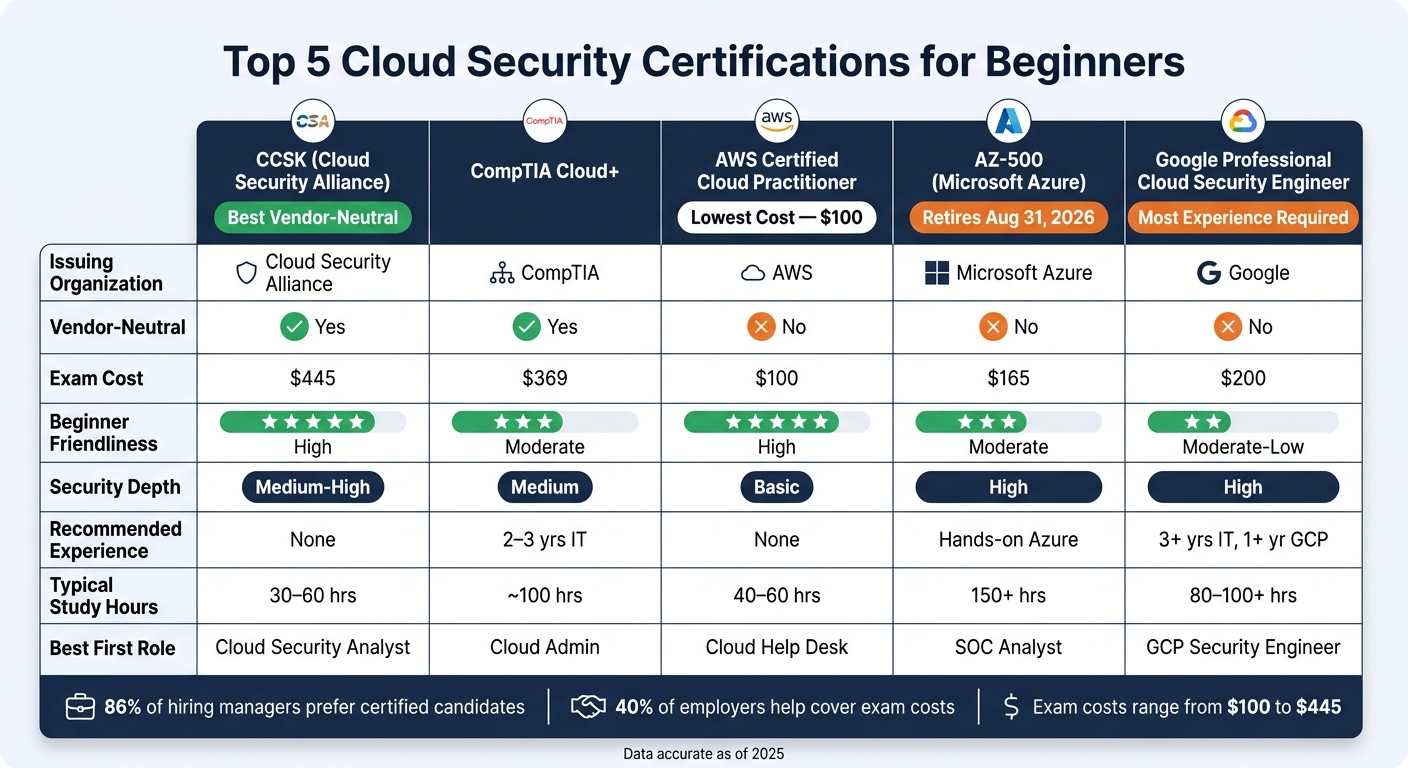
Top 5 Cloud Security Certifications for Beginners: Side-by-Side Comparison
| Certification | Best For | Vendor-Neutral | Cost | Experience Level | Security Depth |
|---|---|---|---|---|---|
| CCSK | Newcomers who want cloud security basics across platforms | Yes | $445 | Beginner | Medium to high |
| CompTIA Cloud+ | People with some IT admin or networking background | Yes | $369 | Early-career to intermediate | Medium |
| AWS Certified Cloud Practitioner | Beginners aiming at AWS | No | $100 | Beginner | Basic |
| AZ-500 | Azure users moving into security work | No | $165 | Intermediate | High |
| Google Professional Cloud Security Engineer | GCP users with prior cloud experience | No | $200 | Intermediate to advanced | High |
The main takeaway is simple: not every “beginner” cert is a true first-step cert. Some are better as step two or three. I’d use this guide to pick the one that fits your starting point, budget, and cloud path.
How to Choose Your First Cloud Security Certification
Start by deciding between vendor-neutral and platform-specific training.
Vendor-neutral certs like CCSK and CompTIA Cloud+ teach cloud ideas that carry across AWS, Azure, and Google Cloud. Platform-specific certs stay focused on one provider’s tools. Those make the most sense if you already work inside that provider’s setup. That one choice cuts the five options down fast.
Taimur Ijlal, founder of The Cloud Security Guy, says beginners with no cloud knowledge should start with a vendor-neutral cert before moving to platform-specific ones.
A path many beginners use looks like this:
- Vendor-neutral first: CCSK or Cloud+
- Then a platform starter cert: AWS Certified Cloud Practitioner
- Then a platform security cert: Microsoft Certified: Azure Security Engineer Associate or Google Professional Cloud Security Engineer
You don’t need to follow that exact route. But it’s a simple way to learn the basics first and then move into provider-specific exams without feeling lost.
Budget and study time also matter. AWS Certified Cloud Practitioner costs $100. CCSK costs $395–$445. Prep time can range from about 80–100 hours for Cloud Practitioner to 120–150 hours for AZ-500. And about 40% of employers reimburse exam and course fees.
There’s also a depth question. Cloud Practitioner and Cloud+ focus on cloud basics. CCSK and AZ-500 dig further into areas like identity, encryption, and threat detection. That split makes the choice a lot easier when you’re picking your first cert below.
1. Certificate of Cloud Security Knowledge (CCSK)
The Certificate of Cloud Security Knowledge (CCSK) comes from the Cloud Security Alliance (CSA) and launched in 2011 as the first cloud security certification. It's vendor-neutral, which makes it a solid starting point for beginners who want broad cloud security coverage before they commit to AWS, Azure, or Google Cloud.
That matters because CCSK focuses on cloud security ideas that carry across providers. You’re not learning one platform’s buttons and menus. You’re learning the core security concepts behind them. So the next thing to look at is depth.
CCSK v5 covers 12 domains, including governance, IAM, data security, incident response, and newer areas like zero trust, AI security, and container security. That range makes CCSK a good fit for beginners who want cloud security knowledge they can take from one provider to another.
Recommended prior experience
The exam has no prerequisites, but the broad topic list still helps people with some technical background. Beginners with basic technical knowledge often study for 30–60 hours. If you're brand new, expect to spend more time getting the basics down first.
"The CCSK is unique in that it provides a structured education with no prerequisites or experience required, while also being the most specialized certificate program when it comes to creating a baseline of knowledge about cloud security." - Nicole Krenz, Website Project Manager, CSA
Exam cost and prep time
The exam token costs $445 and includes two attempts that stay valid for two years. Since the test is open-book, it helps to build a short notes index before exam day. That can save time when you need to find something fast.
| Feature | Details |
|---|---|
| Format | Online, open-book |
| Questions | 60 multiple-choice |
| Time limit | 120 minutes |
| Passing score | 80% |
| Attempts included | 2 (valid for 2 years) |
| Cost | $445 |
| Renewal | No |
If you want something more hands-on and centered on cloud basics first, the next certification is CompTIA Cloud+.
2. CompTIA Cloud+
CompTIA Cloud+ (CV0-004) is a vendor-neutral certification for cloud operations and security across AWS, Azure, and Google Cloud. It works well for beginners who want a broad grounding in cloud before picking one provider. That said, the main thing to understand is this: Cloud+ gives you solid security coverage, but it isn't a security-first cert.
Cloud platform focus
Because Cloud+ is vendor-neutral, it teaches the core ideas that show up across platforms: cloud architecture, deployment, operations, troubleshooting, and DevOps fundamentals. CV0-004 also adds a DevOps Fundamentals domain that covers CI/CD, automation, and infrastructure as code (IaC).
That broad scope is useful when you're starting out. You learn how cloud systems work in general, not just how one vendor does things. But there's a tradeoff. You get breadth more than deep security training.
Security depth
Security accounts for 19% of the exam and includes identity and access management (IAM), vulnerability management, container security, and compliance standards like PCI DSS and ISO 27001. The exam also touches on topics like DLP, WAF, and EDR.
So where does that leave Cloud+? It's best seen as a cloud operations certification with meaningful security coverage, not a pure security exam. It also meets U.S. Department of Defense 8140/8570.01-M requirements. For someone aiming at an entry-level role, that's a solid mix: cloud ops skills plus enough security to get moving.
"CompTIA Cloud+ gives team members the ability to manage complex migrations, oversee multi-cloud environments, secure data, and troubleshoot while maintaining cost-effective operations." - Teresa Sears, Senior Vice President, Product Management, CompTIA
Recommended prior experience
There are no prerequisites, but CompTIA recommends 2–3 years in systems administration or network engineering. That's worth taking seriously. The exam includes hands-on questions, so practice matters.
Using free tiers from AWS, Azure, or Google Cloud can help a lot here. Reading is one thing. Actually spinning up services, dealing with permissions, and fixing broken configs is where the lessons tend to stick.
Exam cost and prep time
The voucher costs $369. You should plan for about 100 hours of study.
| Feature | Details |
|---|---|
| Format | Multiple-choice and performance-based |
| Questions | Max 90 |
| Time limit | 90 minutes |
| Passing score | 750 (scale of 100–900) |
| Cost | $369 |
| Recommended experience | 2–3 years in systems administration or network engineering |
If you want a platform-specific starter after this, AWS is usually the easiest entry point.
3. AWS Certified Cloud Practitioner
The AWS Certified Cloud Practitioner (CLF-C02) is a beginner-level AWS certification. If you've already learned general cloud basics, this is one of the easiest ways to start with a single platform.
Cloud platform focus
This AWS-only cert covers the main ideas, core services like EC2, S3, and VPC, plus the basic terms AWS uses every day.
Security depth
Security and Compliance makes up 30% of the exam, so this is the domain that deserves extra attention. Put most of your study time into the AWS Shared Responsibility Model, the Security Pillar of the AWS Well-Architected Framework, and basic compliance programs.
These are the AWS security services beginners should be able to identify on the exam:
| Security Service | What It Does |
|---|---|
| IAM | Controls access to AWS resources |
| CloudTrail | Logs API calls and account activity for auditing |
| GuardDuty | Managed threat detection |
| Shield | DDoS protection |
| WAF | Protects web applications from common exploits |
The goal here isn't deep setup knowledge. It's knowing what each service is for. Spend extra time on IAM in particular: users, groups, roles, and policies.
Recommended prior experience
There are no formal prerequisites. AWS suggests about six months of exposure to AWS Cloud concepts, along with a basic understanding of IT services.
If you practice in the AWS Free Tier, set up a billing alarm in AWS CloudWatch as soon as you start. It's a simple step, and it can save you from surprise charges.
Exam cost and prep time
The exam costs $100. Most beginners need about 40 to 60 hours of study, which usually works out to 4 to 6 weeks if you're studying 5 to 8 hours per week.
| Feature | Details |
|---|---|
| Exam Code | CLF-C02 |
| Questions | 65 (multiple-choice or multiple-response) |
| Time limit | 90 minutes |
| Passing score | 700 out of 1,000 |
| Cost | $100 |
| Validity | 3 years |
A strong free place to begin is the "AWS Cloud Practitioner Essentials" course on AWS Skill Builder. It's a six-hour digital course, it covers every exam domain, and it costs nothing.
A good rule of thumb: once you're scoring 80% or higher on practice tests, you're ready to book the exam.
If you want a more hands-on security path after AWS basics, the next option shifts over to Microsoft Azure.
4. Microsoft Certified: Azure Security Engineer Associate
If AWS isn't your target platform, Azure is the next stop. Microsoft Certified: Azure Security Engineer Associate (AZ-500) is a mid-level cert built fully around Microsoft Azure. It's a good fit for beginners who already understand Azure basics and want hands-on security work in a live Azure setup.
That's why it belongs here. If you start with Azure fundamentals, AZ-500 is a direct path into day-to-day security tasks.
There is one timing issue to think about: AZ-500 retires on August 31, 2026, so beginners should weigh that against their study plan and career timeline.
Cloud platform focus
This cert centers on Azure security tools and controls. The main tools include Microsoft Entra ID, Defender for Cloud, and Microsoft Sentinel.
Security depth
AZ-500 leans hard into practical Azure security controls. The exam is split across four test areas, and the biggest chunk covers security operations with Defender for Cloud and Sentinel.
You'll need to know how Azure handles:
- identity protection
- network isolation
- data security
- threat management
- KQL (Kusto Query Language) for log analysis in Sentinel
| Exam Domain | Weighting | Key Tools |
|---|---|---|
| Secure identity and access | 15–20% | Entra ID, MFA, PIM, Conditional Access |
| Secure networking | 20–25% | NSGs, Azure Firewall, WAF, Private Link |
| Secure compute, storage, and databases | 20–25% | Key Vault, Disk Encryption, Transparent Data Encryption (TDE), dynamic data masking |
| Security operations | 30–35% | Defender for Cloud, Sentinel, alerts, automation |
The exam also includes hands-on lab tasks. So this isn't just theory. You'll need to work through tasks the way you would in an actual Azure environment.
Recommended prior experience
Microsoft doesn't list formal prerequisites. Still, AZ-900 and AZ-104 are the strongest prep path before taking AZ-500.
Exam cost and prep time
The exam costs $165 in the U.S.. Someone with Azure job experience may get ready in 40–60 hours, but beginners should expect 150+ hours over about three to four months.
The cert stays valid for 12 months and can be renewed at no cost through Microsoft Learn.
| Feature | Details |
|---|---|
| Exam Code | AZ-500 |
| Questions | 40–60 |
| Time limit | 100–120 minutes |
| Passing score | 700 out of 1,000 |
| Cost | $165 |
| Validity | 12 months, free renewal |
| Retirement date | August 31, 2026 |
If Azure is your target, AZ-500 is the clearest hands-on option before moving to Google Cloud security.
5. Google Professional Cloud Security Engineer
Google Professional Cloud Security Engineer is Google Cloud’s advanced security certification. If you’re new to cloud, think of this as a stretch goal, not your first stop. It makes more sense after you’ve learned the basics of GCP. On a beginner path, this is the GCP endpoint, not the place to begin.
Cloud platform focus
This certification is focused ONLY on Google Cloud Platform (GCP). It covers GCP security tools like Cloud Armor, VPC Service Controls, Security Command Center, and Cloud KMS. Google’s security approach leans hard on Zero Trust and BeyondCorp, so identity and access management (IAM) plays a big role in the exam.
Security depth
This exam uses scenario-based questions. In plain English, you’ll often get a cloud setup and need to pick the best way to fix a security issue. That makes the test feel closer to day-to-day security work than simple fact recall.
The exam covers five domains:
| Domain | Exam Weight |
|---|---|
| Configuring access | 25% |
| Ensuring data protection | 23% |
| Securing communications and boundary protection | 22% |
| Managing operations | 19% |
| Compliance | 11% |
Recent updates also add AI/ML workload security and software supply chain protection.
Recommended prior experience
Google recommends 3+ years of field experience, including 1+ year on GCP. There are no formal prerequisites, so anyone can register. That said, you should be comfortable with Linux, command-line tools, and reading basic Python or JavaScript.
If you’re starting from zero, the usual path looks like this:
- Cloud Digital Leader
- Associate Cloud Engineer
- Google Professional Cloud Security Engineer
Exam cost and prep time
The exam costs $200, plus tax where it applies. Most people who already have some cloud background spend about 8–12 weeks preparing, which works out to roughly 80–100+ hours of study. The certification stays valid for 2 years, and recertification costs $100. For hands-on work, Google Cloud Skills Boost labs are a solid place to practice.
| Feature | Details |
|---|---|
| Questions | 50–60 multiple-choice and multiple-select |
| Time limit | 2 hours |
| Cost | $200, plus tax where applicable |
| Recertification cost | $100 |
| Validity | 2 years |
| Recommended experience | 3+ years of field experience, including 1+ year on GCP |
Next, compare all five certifications side by side to match difficulty, cost, and focus.
Side-by-Side Comparison of All 5 Certifications
Compare the five options below before you choose. The big tradeoff is pretty simple: start with broad cloud basics or go deeper into platform security later.
| Certification | Issuing Org | Vendor-Neutral? | Beginner Friendliness | Security Focus | Recommended Experience | Exam Cost (USD) | Typical First Roles |
|---|---|---|---|---|---|---|---|
| CCSK | Cloud Security Alliance (CSA) | ✅ Yes | High | Broad cloud security theory | None; basic IT helpful | $445 | Cloud Security Analyst, Compliance Officer |
| CompTIA Cloud+ | CompTIA | ✅ Yes | Moderate | Moderate security plus cloud operations | 2–3 years in IT/networking | $369 | Cloud Admin, Systems Administrator |
| AWS Certified Cloud Practitioner | Amazon (AWS) | ❌ No (AWS only) | High | High-level security overview | None | $100 | Cloud Help Desk, Junior Administrator |
| Microsoft Certified: Azure Security Engineer Associate (AZ-500) | Microsoft | ❌ No (Azure only) | Moderate | Deep Azure security implementation | Hands-on Azure experience | ~$165 | Junior Security Analyst, SOC Analyst, Azure Security Engineer |
| Google Professional Cloud Security Engineer | ❌ No (GCP only) | Moderate/Low | Deep GCP security engineering | 3+ years IT; 1+ year GCP | ~$200 | GCP Security Engineer, Security Consultant |
Three differences stand out right away.
- AWS Certified Cloud Practitioner is the lowest-cost option at $100, but it also offers the least security depth.
- CCSK is the most expensive at $445, but it gives you the broadest vendor-neutral cloud security base.
- AZ-500 and Google Professional Cloud Security Engineer go much deeper on security, though both are tied to one platform and expect hands-on experience.
That leaves CompTIA Cloud+ in the middle. It’s vendor-neutral, leans more into operations, and tends to fit people who already have some IT background. If you’re trying to narrow your options, that difference in depth and difficulty helps a lot.
From there, the best pick depends on two things: the cloud platform you want to work with and how much hands-on experience you already have.
Next, match the best option to your current skill level and target role.
Which Certification Fits Your Career Goals?
Use the comparison above to line up each cert with the kind of job you want. The best pick usually comes down to two things: your target role and the cloud platform you plan to work with.
- CCSK works well for beginners who want vendor-neutral cloud security basics.
- AWS Certified Cloud Practitioner fits beginners aiming for AWS roles.
- CompTIA Cloud+ suits cloud operations roles and includes some security coverage.
- AZ-500 is the best match for Azure security administration.
- Google Professional Cloud Security Engineer is the best match for Google Cloud security engineering.
After you narrow down the role, the next step is simple: do you want vendor-neutral training or provider-specific training?
If you're already headed toward Azure or GCP, the Microsoft or Google certs are the clear fit. If you're still figuring out where you want to land, start with a vendor-neutral option. But if you already know your cloud stack, go with that provider's cert.
Conclusion
Use the comparison above to make your final pick. There isn't one cloud security certification that works for every beginner. The best choice depends on your platform and your current skill level.
If you're starting from zero, a foundation-level cert like CCSK or AWS Certified Cloud Practitioner gives you a solid starting point without throwing too much at you at once.
That first certification can help you land interviews. But certs alone won't carry you. Your skills matter more. Once you pick a path, back it up with hands-on work. Use free-tier or trial accounts from AWS, Azure, or GCP to build secure configurations and put together a small portfolio. Root School offers structured guidance for aspiring cybersecurity professionals.
FAQs
Which certification should I start with if I have no IT experience?
Start by building a base in cloud and security concepts. If you want a cloud-focused path and you're starting from scratch, AWS Certified Cloud Practitioner or Microsoft Certified Azure Fundamentals (AZ-900) are solid places to begin, depending on which platform you want to learn first.
If security is your main focus, EC-Council Cloud Security Essentials (CSE) is built for beginners. And don't just study the material on paper - pair it with hands-on labs so you can turn ideas into skills.
Is a vendor-neutral certification better than an AWS, Azure, or GCP cert?
Neither path is better by default. It comes down to where you are in your career and what kind of role you want next.
Vendor-neutral certifications, like the CCSK, are often a strong place to start. They teach core cloud security concepts that apply across platforms, not just one provider.
By contrast, AWS, Azure, and GCP certifications show platform-specific skills that employers may be looking for. That can matter a lot if a job calls for hands-on work in one cloud stack.
A common path looks like this:
- Start with a vendor-neutral cert to learn the basics
- Add a provider-specific cert once you know which platform you want to work with
That way, you build broad cloud security knowledge first, then prove you can apply it in a platform employers use every day.
Can a cloud security certification help me get my first job?
Yes. A cloud security certification can help you land your first job. It shows employers that you have practical, industry-recognized skills and that you’ve taken the time to learn how cloud environments work.
That matters, especially when you’re trying to break into the field without much hands-on job experience. A certification can help you stand out in a crowded market and, in some cases, shorten your job search.
Root School also offers resources for aspiring cybersecurity professionals who are working toward their first role.